


What is PLC? Structure, Classification, Operating Principle and Application
A programmable logic controller, or PLC, is a rugged computer used for industrial automation. These controllers can automate a specific process, machine function, or even an entire production line.
PLC stands for Programmable Logic Controller which was invented in the automobile manufacturing to provide a flexible, rugged and easy to program controller to automate a system in 1964 by Dick Morely. It is a hardware device with a microprocessor based control system. A PLC is a general purpose computer specially modified to perform control tasks.
It is used in industrial automation to automate a specific process, machine function or even an entire production. PLCs were developed to electronically replace hard-wired relay logic circuit systems to control machinery. They are designed for industrial use to control a variety of automated processes in industries.
It is used in industrial automation to automate a specific process, machine function or even an entire production. PLCs were developed to electronically replace hard-wired relay logic circuit systems to control machinery. They are designed for industrial use to control a variety of automated processes in industries.
What is a Programmable Logic Controller (PLC)?
A programmable logic controller (PLC) is a specialized digital computer used in industrial settings for automation and control. Acting as the central brain of machines and processes, PLCs receive input data from sensors, process the data through programmed logic, and generate output signals to control devices such as motors and valves.
They use a programming language, often ladder logic, similar to an electrical relay diagram. PLCs are hardened for harsh industrial environments and play a vital role in automating tasks and reducing production and energy. Their modular design allows for expandability, making them versatile components in modern industrial control systems.

Structure of PLC
PLC (Programmable Logic Controller) is an industrial electronic device used to automate production processes. It replaces traditional relay systems by using programming software to control machines. The basic structure of PLC includes the following components:
Central Processing Unit (CPU):
- Function: The "brain" of PLC, executes commands from the programming program, processes input signals and controls output.
- Components: Microprocessor, memory (RAM, ROM, EEPROM) to store programs and data.
Input Module:
- Function: Receives signals from peripheral devices such as sensors (temperature, pressure), switches, buttons.
- Signal type: Digital signal (digital: 0/1) or analog signal (analog: 0-10V, 4-20mA).
- Example: Optical sensor indicates incoming material on the conveyor.
Output Module:
- Function: Send control signals to actuators such as motors, valves, lights, relays.
- Signal type: Digital signal (on/off) or analog signal (level adjustment).
- Example: Turn on the conveyor motor when receiving a signal from the sensor.
Power Supply:
- Function: Provide stable voltage (usually 24VDC or 220VAC) for the CPU and modules.
- Characteristics: Can be integrated in the PLC or used with an external power source.
Memory:
- ROM: Stores the PLC firmware.
- RAM: Stores temporary data during operation.
- EEPROM/Flash: Save user program, keep data when power off.
- Function: Store control program and operating data.
Communication Ports:
- Function: Connect PLC to computer (for programming), HMI (human-machine interface), or other PLCs.
- Protocol: RS232, RS485, Ethernet, Modbus, Profibus.
Enclosure: Function: Protect components from dust, water, and environmental impact (meet IP65, IP67 standards depending on type).
- Basic configuration of PLC with block diagram

Principle of PLC operation
PLC operates in a repetitive scan cycle, based on a pre-programmed program. The basic principle includes 3 main stages:
Input Scan:
- PLC reads the status of all input signals from sensors, switches (e.g. 0 or 1, on or off).
- The data is saved to the temporary memory (input image table) for processing.
- For example: The sensor detects material on the conveyor belt and sends a "1" signal to the PLC.
Program Execution:
- CPU executes the programming program (usually written in Ladder Diagram, Function Block, or Structured Text).
- Based on the programmed logic, the PLC analyzes the input signal and makes a control decision.
- For example: If the sensor indicates "1" (there is material), the program commands the conveyor motor to turn on.
- Logical operations (AND, OR, NOT) or calculations (timer, counter) are performed in this stage.
Output Update:
- After processing, the PLC sends control signals to the output devices via the output module.
- The output status is updated in the memory (output image table) and transmitted to the actual device.
- For example: The conveyor motor receives the "on" signal and starts rotating.
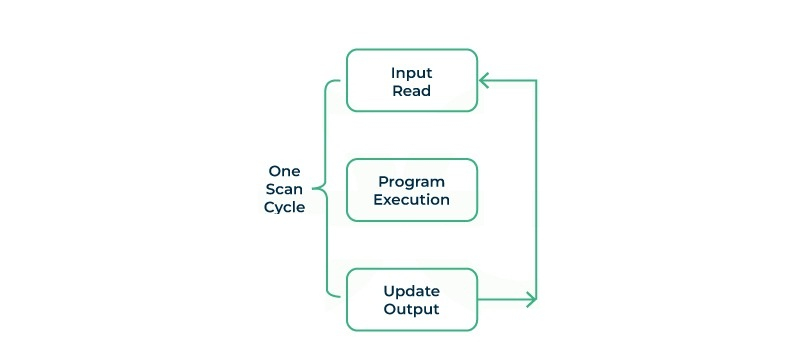
How a PLC Programmable Controller Works
Popular PLC Types on the Market
In the market today, there are many popular PLC (Programmable Logic Controller) types from major brands, classified based on size, capacity, application and features. Below are the popular PLC types and their outstanding features:
1. Compact PLC
- Features: Integrates CPU, input/output (I/O) modules and power in a compact block. Limited number of I/O (usually 10-200 points). Low to medium processing capacity.
- Advantages: Low cost, easy to install, suitable for simple systems.
- Disadvantages: Cannot expand many I/O, limited in complex features.
- Applications: Mini conveyors, packaging machines, small pump control.
2. Modular PLC
- Features: Includes separate CPU and removable, expandable I/O, power, and communication modules. Large number of I/O (hundreds to thousands of points). Supports complex, multi-tasking processing.
- Advantages: Flexible, easy to upgrade, suitable for large systems.
- Disadvantages: High price, requires skilled technicians to install.
- Applications: Automobile manufacturing plants, metallurgy, complex production lines.
3. Mid-range PLC
- Features: Combination of compactness and expandability, I/O from 50-500 points. Integrated Ethernet communication, supports medium speed control.
- Advantages: Balance between cost and performance, easy to use.
- Disadvantages: Not optimal for systems that are too small or too large.
- Applications: CNC machine control, HVAC system, medium-sized production line.
4. High-end PLC
- Features: High processing capacity, I/O up to tens of thousands of points. Supports complex industrial networks (Profibus, Profinet, EtherCAT). Integrated AI, big data processing.
- Advantages: Meets large systems, integrates modern technology.
- Disadvantages: Very high price, requires expert operation.
- Applications: Chemical plants, oil and gas, comprehensive automation systems.
5. Micro PLC
- Features: Very small size, I/O under 50 points. Low capacity, cheapest price.
- Advantages: Cheap, easy to deploy for single applications.
- Disadvantages: Limited functions, not expandable.
- Applications: Controlling traffic lights, water pumps, home appliances.
6. Specialized PLC
- Features: Designed for specific purposes such as motion control, safety, or real-time.
- Advantages: Optimized for specific applications, high reliability.
- Disadvantages: High price, only used for specific purposes.
- Applications: Industrial robots, injection molding machines, safety systems.
PLC Features
PLCs have a variety of features, making them versatile. The features are:
- Digital and analog I/O: Can process digital and analog signals from sensors and other input devices and allow for a variety of inputs.
- Scalability: Many PLCs offer the ability to adjust their settings by expanding the number of inputs/outputs or expanding the CPU to accommodate changing requirements.
- Interface communications: PLCs support a variety of communication devices and protocols such as Ethernet, Modbus devices such as CPUs, monitoring and control systems.
- Language language installers: Allow users to use a variety of language installers such as ladder logic, structured text, block function diagrams, etc.
- Real-time monitoring: PLCs operate in real-time by continuously scanning and processing input signals to make quick decisions and update output devices at a minimum rate.
- Math learning functions: PLCs support math functions and calculations, allowing users to perform calculations allowed in the control program.
Advantages and Disadvantages of Using a PLC
Some of the advantages and disadvantages of PLCs are:
- Advantages:
PLCs have been a standard component of industrial machinery design for decades. What advantages do PLCs have that make them such a popular choice?
- Flexibility in programming and easy adaptability to different control requirements and applications
- Reliable operation even under difficult conditions
- Wide range of PLC options on the market, each tailored to specific needs
- Scalability to meet changing automation needs
- Real-time control for quick response and precise coordination of machines and processes
- Built-in diagnostics and monitoring features simplify troubleshooting and maintenance tasks
- Seamless integration with other automation components and systems facilitates data exchange and coordination
- Supports the implementation of safety functions, enhancing workplace safety
- Collects and records data for analysis, enabling performance monitoring, predictive maintenance and process optimization
- Better long-term value due to lower maintenance costs and increased system flexibility, making them a cost-effective choice over time
- Disadvantages:
No technology is perfect for every situation, and there are some applications where PLCs are not the best choice. Let's take a look at some of the most significant potential disadvantages of using PLCs.
- Specialized knowledge required for programming
- Higher initial cost than other traditional control systems
- If the system is not protected, it is more vulnerable to cyber attacks
- Different PLC brands may use proprietary programming languages or software
Applications of PLCs in Industry
- Automation of manufacturing products: PLCs are widely used in large manufacturing products to automate processes such as rapid chain, packaging, and material handling.
- Process Control: In industries such as chemical, petrochemical and pharmaceutical, PLCs play an important role in controlling and monitoring complex processes.
- Water Treatment and Distribution: PLCs are used in water treatment plants to control water purification, monitor water quality and manage water distribution in the network.
- Food and Beverage Industry: PLCs can be used in food processing machinery products to perform tasks such as mixing, packaging, quality control, etc.
- HVAC Systems: PLCs play an important role in heating, ventilation, air conditioning systems to manage temperature, humidity, air quality, etc.
Choosing the Right PLC
Many factors will influence your choice when it comes to specifying a PLC model for your application. Some key considerations include:
- Electrical Power: PLCs have different voltage requirements for their power supplies, so check to make sure your choice is compatible with your electrical system.
- Processing Speed: Check the CPU speed of your PLC model to determine if it meets your application needs.
- Compatibility: Make sure your PLC model is compatible with any new or existing system hardware, whether it is a power supply or DIN rail.
- Temperature Resistance: Most PLCs are designed to operate safely in a range of 0 to 60°C. However, some specialized PLC models can operate in extreme temperatures, which is important for facilities with unusually hot or cold manufacturing conditions.
- Memory: A PLC needs enough ROM and RAM to perform the processes it is intended to automate. The controller uses ROM to store the operating system and instructions and RAM to perform its functions.
- Connectivity: Make sure your PLC has enough input and output ports and can connect to the type of peripherals your system requires.
- Analog I/O: Although PLCs are primarily used for discrete functions, some models also have analog inputs and outputs that can control processes with continuous variables.
PLC Setup
Installing a PLC involves several steps, some of which will depend on the specific brand and model of PLC. The following guide provides a general outline of the steps typically required to get a PLC up and running, but it is recommended to consult the manufacturer's documentation for specific instructions to ensure that no steps are missed during the process.
- Installing the programming software: First, you will need to download and install the programming software for your PLC. This is usually a proprietary application that the PLC manufacturer will allow customers to download from their website.
- Create a new project: Open the programming software and create a new project. You will need to specify details such as the PLC model you are using and the communication interface (e.g. Ethernet, USB) to connect to the PLC.
- Configure the hardware: Define the hardware configuration of the PLC in the software. This includes specifying the types and locations of I/O modules, as well as any additional hardware connected to the PLC, such as communication modules or special function cards. This process may also include mapping physical inputs (e.g. sensors, switches) and outputs (e.g. actuators, valves) to memory locations in the PLC.
- Write the Program Logic: The next step is to develop the program logic using the programming software provided by the manufacturer. This is the core of the PLC's functionality, defining how it will process input data during operation. Once the logic is complete, the program will need to be compiled so that it can be installed and executed on the PLC. Your PLC software may support a variety of programming languages, allowing you to choose the one that best suits you. For more information on PLC Programming Languages, see the section below.
- Download the Program: Once you have written and compiled your program logic, it will need to be downloaded to the PLC. This process transfers the program from the development PC to the PLC's memory. The program can be transferred over a network or a USB port, depending on the device's support.
- Test and Debug: Test the PLC program in simulation or offline mode to verify its functionality. Check for any logic errors or unexpected behavior and debug as necessary. After thoroughly evaluating the performance of your program, you can confidently deploy it into real-world applications knowing that your program logic is sound.
- Online monitoring and maintenance: After deploying your program to your PLC, online monitoring tools provided by some manufacturers will allow you to monitor the PLC's performance in real time. This allows you to diagnose problems, make adjustments, and perform maintenance tasks as needed while the PLC is running, allowing you to optimize your processes over time.
Throughout the programming process, it is important to follow PLC programming best practices, such as organizing code efficiently, documenting logic, and implementing safety measures, thus ensuring the entire system operates reliably and safely.
PLC Programming Languages
Programmable logic controllers (PLCs) can be programmed in a variety of programming languages, depending on the manufacturer and model of the PLC. Below are some of the most commonly used PLC programming languages, with examples of a single function written in each language for reference.
- Ladder Logic (LAD)
Ladder Logic Diagram is the traditional and most widely used PLC programming language. It simulates electrical relay logic (on/off states) and is visually represented in a ladder-like format, with the rungs representing the control logic. Ladder Logic is particularly user-friendly for those with a background in electrical engineering or relay control systems. It is best suited for simple control systems and applications where binary decisions are dominant.
- Function Block Diagram (FBD)
A function block diagram is a graphical language that uses blocks to represent functions, with lines connecting them to define relationships. Each block can represent a simple function such as a timer or a more complex operation such as a mathematical function. FBD is especially effective for process control and applications involving complex mathematical operations. It is user-friendly for those with a background in control systems and process engineering.
- Structured Text (ST)
Structured Text is a high-level text programming language that uses statements similar to Pascal or C. It is suitable for complex applications that require algorithms, data processing, or tasks that are difficult to represent graphically. ST is best used in applications that require complex control, computation, and data manipulation.
- Sequential Function Diagrams (SFCs)
Sequential Function Diagrams are used to describe the sequence of control operations in a system. SFCs are graphical and represent process flows, making them ideal for sequential control processes and tasks that require the coordination of multiple operations or stages. They are especially useful in batch processing and applications where the sequence of operations is an important aspect.
- Instruction Lists (ILs)
Instruction List is a low-level programming language similar to assembly language. This textual language consists of a series of instructions, each of which represents a different operation. Its compact and efficient nature makes it suitable for applications with limited memory and processing power. However, using Instruction List requires a thorough understanding of programming concepts and can be less intuitive than graphical languages such as Ladder Logic.
While these programming languages provide the same functionality in most cases, your choice can significantly impact the development time, maintainability, and scalability of your control system. Choosing the right programming language depends on the specific requirements of the application, the complexity of the tasks, and the skill level of the personnel involved in programming and maintenance.
Conclusion
Programmable logic controllers, or PLCs, are at the forefront of industrial automation. PLCs have emerged as an indispensable tool in industrial automation, playing a pivotal role in improving efficiency, accuracy, and flexibility in a variety of manufacturing processes. Over the years, PLCs have evolved from simple relay-based control systems to sophisticated programmable devices capable of performing complex tasks. Their adaptability, reliability, and scalability have made them indispensable components in a variety of industries, including manufacturing, energy, and process automation.
Tags
PLC
Những câu hỏi thường gặp


